Going sub-pixel with PyGame
So you are writing a game in PyGame and you come up with the most beautiful particle effect. But when you implement it, you find that the particles seem to jitter between pixels, and it spoils the effect. This is because PyGame can only render sprites at integer coordinates, even if you give it float values. OpenGL or other 3D APIs don't suffer from this because they can apply filtering and effectively render images between pixels (or sub-pixel). But you can't do that with a 2D blitter.
Until now that is! :-) I've written a small module that pre-calculates sub-pixel sprites so that you can render a PyGame surface at fractional coordinates. It's nice and easy to use, and is almost a drop in replacement. Here's an example:
ball = pygame.image.load("ball.png")
ball_subpixel = SubPixelSurface(ball)
x, y = 100.23, 60.58323
screen.blit(ball_subpixel.at(x, y), (x, y))
It's as fast to blit sub-pixel surfaces as it is to blit regular surfaces, but there is a downside I'm afraid (isn't there always). Because of the pre-calculation, more memory is required to store the sub-pixel surface. The default level of sub-pixel accuracy uses 9X the memory. I recommend using it for small sprites, but not for large images or images that don't move. The code is completely public domain. It requires the Numeric library.
Download subpixel.zipBecause of the nature of sub-pixel surfaces you really need to see it moving to appreciate it, but here is a screen-shot of the sample code in the zip.
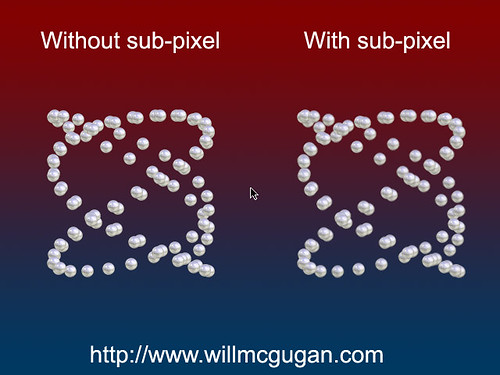
Update. A few people have commented that a screen shot is pointless. So that you don't have to run the sample code, I have generated an animated gif to demonstrate the effect. The spheres at the the top are sub-pixel, the spheres below that are blitted in the usual manner.

[...] McGugan has just posted some Pygame code that will allow subpixel rendering, which should allow Pygame developers to render smooth looking graphics using software rendering [...]
Wow... that is amazing. Do you have any other special effects like this? :-)
cool. I've tested some sub-pixel drawing with opengl and it work worst in some cases (blur, waves, shape losing, etc). probably your precalculation code can help me ^_^
Wow, My eyes must really suck because I cannot tell teh difference between the 2.
I have a problem trying to run the demo. It is complaining it cannot find the Numeric package. I have search but I can only find the NumPy module. Could you help with this?
I can indeed.
Numeric library
[...] with PyGame April 26th, 2007 — drawk | Edit Will McGugan posted an article about subpixel manipulation in Python. This is possible in other technologies like OpenGL and DirectX but Will has implemented it in [...]
Hi Will,
Thanks for the link. The problem is that there is no Numeric library for Python 2.5 which I'm using :-(. Any other hint?
Regards.
I found a package of the Numeric to use in the Python 2.5. http://biopython.org/wiki/Download
Now it is working. Quite impresive effect!!
Regards.
Glad you got it working. :-)
I've uploaded a new version that uses NumPy (which has builds for 2.5) if available, or fall back to Numeric if it isn't.
smooth!!
Your new version still breaks with numpy on my system:
subpixelsurface.py:43: RuntimeWarning: use surfarray: No module named Numeric
surf_array_rgb[1:ow+1:, 1:oh+1:, ::] = pygame.surfarray.array3d(surface)
Traceback (most recent call last):
File "testsubpixelbitmap.py", line 46, in ?
run()
File "testsubpixelbitmap.py", line 18, in run
pingball_subpixel = SubPixelSurface(pingball, x_level=4)
File "D:\pydemo\src\subpixel\subpixelsurface.py", line 43, in __init__
surf_array_rgb[1:ow+1:, 1:oh+1:, ::] = pygame.surfarray.array3d(surface)
File "d:\pydemo\lib\python2.4\pygame-1.7.1release-py2.4-win32.egg\pygame\__ini
t__.py", line 52, in __getattr__
raise NotImplementedError, MissingPygameModule
NotImplementedError: surfarray module not available
Not sure what is happening there. At a guess I would say that the pygame.surfarray module is actualy dependant on Numeric, even if Numpy is used to manipulate the returned array.
Just checked pygame pygame\__init__.py, and that does appear to be the case. Try replacing the 'import Numeric' line in there with 'import numpy as Numeric'.
I've spent some time trying to resolve this error -- which I'll admit may have more to do with pygame.image than the subpixel code, but since I am unable to resolve it, I thought someone here might have some insight.
Traceback (most recent call last):
[...]
File "/home/kevin/src/python/pygame/subpixel/subpixel/subpixelsurface.py", line 89, in _generate
pygame_surface = pygame.image.fromstring(rgba_data, a.shape[:2][::-1], "RGBA")
ValueError: String length does not equal format and resolution size
Hi Kevin,
Haven't seen that myself. Could you find the length of rgba_data, and the value of a.shape[:2][::-1].
And if you could send me a minimal sample, and the bitmap that is causing the problem, I'll take a look at it.
[...] escribió un pequeño paquete que toma una superficie (un Surface) de Python y lo transforma en una superficie capaz de dibujar objetos con coordenadas fraccionales, justo como lo harías con OpenGL u otra librería 3D. Al hacer este procedimiento con el código [...]
Nice job. I have a question, though: would it be possible to extend this to use subpixels like ClearType font rendering does in Windows? I'm wondering because I'm trying to move some fonts around with this library and the fonts just don't look very good without the ability to use the color subpixels as well.
Enlarge the Surface by a multiple of 10
Enlarge the Surface to blit by the same above
multiply the x and y to blit by the same above
Then blit
Then shrink by the same above!
Hello, your images don't work. I'll just wait here patiently until they are fixed. Thank you!