Turning website favicons in to 3D
The feedback I recieved from Reddit about locidesktop.com (my hobby project) was encouraging.
If you would like to join the beta program for locidesktop, please leave a comment below…
One of the comments pointed out that although there is a large choice of icons available, there isn't always a clear recognizable image for each site, and it would be nice if locidesktop would use ‘favicons’. I had considered using favicons previously, but rejected the idea because they are just 16x16 pixels in size, and I wanted to use large images for icons.
I didn't want blurry scaled icons either, and I may have abandoned the idea if a Reddit user hadn't pointed me at this which recommended embracing the pixelated look of favicons for use at desktop icons. I figured I could take this idea a step further and render 3D images from any given 16x16 image, using a combination of Python, Mako templates and Povray – the same combination of technologies I used for my (now defunct) 3D pie chart project.
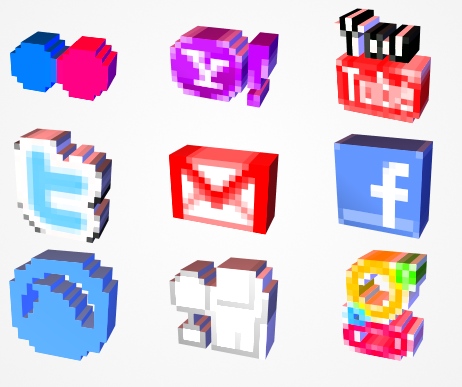
I knocked up the scripts to pass the time on a long train journey recently. The results were encouraging! The image insert shows a few of the icons I generate with the first pass at this. Some turn out better than others, but they would all work as recognizable icons.
The Code
The code is not too complex, and consists of a single Python script that uses Python Image Library to read an image and scan each pixel. The results of the image scanning process are then passed to a Mako template, which produces a Povray scene file.
#!/usr/bin/env python

import Image
from math import *

class Col(object):

    def __init__(self, r, g, b, a=1.0):
        self.r = r
        self.g = g
        self.b = b
        self.a = a

class ImageScan(object):

    def __init__(self, image):

        self.image = image
        self.scan()

    def scan(self):

        w, h = self.image.size
        step_w = 1.0 / w
        step_h = 1.0 / h
        self.pixel_x_size = step_w
        self.pixel_y_size = step_h

        im = self.image
        getpixel = im.getpixel

        pixels = []

        for y in range(h):

            row = []
            for x in range(w):

                c = getpixel( (x, h-1-y) )

                # Skip transparent, and almost transparent pixels
                if c[-1] > 32:
                    c = Col( *(i/255.0 for i in c) )
                    ix = x * step_w
                    iy = y * step_h
                    row.append( (ix, iy, c) )

            pixels.append(row)

        self.pixels = pixels

    def __iter__(self):
        return iter(self.pixels)


if __name__ == "__main__":

    import sys
    filename = sys.argv[1]

    image = Image.open(filename)
    image = image.convert('RGBA')

    ims = ImageScan(image)

    td = {}
    td['image'] = ims


    from mako.template import Template

    output_filename = filename.split('.')[0] + '_favicon.png'

    mytemplate = Template(filename='favicon.pov')
    open('out.pov', 'w').write(mytemplate.render(**td))

    import os
    os.system('povray out.pov -O%s +A0.1 -w128 -h128 +UA +R8' % output_filename)
    print "Output", output_filename
Povray scene files are kind of like a half-way point between data and a programming language; there are variables and expressions and some control structures, but when you combine them with a templating system, like Mako, it creates a remarkably flexible system where 3D images can be programatically generated.
The favicon template loops through the scanned image data passed to it by the script. This data contains the location and colour of each visible pixel, which the template uses to generate a coloured cubiod in the scene, per pixel. These cuboids combine to create a three dimensional version of the original icon image.
#version 3.6;

#declare pixel_finish =
  finish {
    ambient rgb <1.0,1.0,1.0>*.1
    brilliance  2.54
    crand       0.000
    diffuse     0.813
    metallic    1.5000
    phong       2.093
    phong_size  1.000
    specular    0.425
    roughness   0.001
  }

#declare Camera0 =
camera {
  perspective
  location <2.173,1.520+1,5.820>/2
  up y
  right -1.000*x
  angle 22.000
  sky <-0.083,0.971,-0.223>
  look_at < 0, 0, 0 >
}

light_source {
  < 2, 4, 10 >, color rgb <1, 1, 1>*.9
}

light_source {
    <12, 1, -1.5>, color rgb <.3, .3, .6>
}

light_source {
    <0, 10, -1.5>, color rgb <.6, .3, .3>
}

union {
% for row in image:
% for x, y, c in row:
box {
    <${x-.5}, ${y-.5}, -0.5> , <${x-.5 + image.pixel_x_size}, ${y-.5 + image.pixel_y_size}, 0.5>
    texture {
        pigment { color rgbft <${c.r}, ${c.g}, ${c.b}, 0, 0.0> }
        finish { pixel_finish }
    }
    scale <1, 1, 0.4>
    no_shadow
}
% endfor
% endfor
}

camera{ Camera0 }
Because it is such a simple scene, Povray takes just a second to render a 128x128 image. So quick that it may be practical to render these image on-the-fly when required. Or I may just render a few thousand favicons for popular sites and upload them.
Hopefully you will see these 3D favicons on locidesktop.com in the coming weeks…
I'm you Martin - 12 years later here I'm being you. I certainly love this but dont know what's going on.