Hopefully you should see a spinning texture mapped globe below, which is rendered entirely with Javascript and HTML. No Flash, Canvas tags or animated Gifs. Just a bunch of divs, some CSS and a sprinkling of Javascript. Tested on Firefox and Opera.

How it works

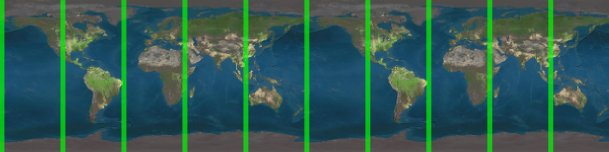
Update: Added some green lines, because some people weren't convinced!
 

20 Comments on "JS Globe"

  • JD
    May 30th, 2009, 5:40 p.m.

    I see the globe, but it runs super slow in Firefox, interfering with my typing. The display is handled better in IE. Still pretty cool.

  • BoydWaters
    May 30th, 2009, 6:49 p.m.

    In Safari, no textures…

  • BoydWaters
    May 30th, 2009, 6:50 p.m.

    whaa.. after I posted a comment, the textures appeared – spinning globe! Wow!

  • GirldOceans
    May 30th, 2009, 7:06 p.m.

    In Safari, no textures…

  • May 30th, 2009, 7:16 p.m.

    I see a white ball in Firefox 3.0.10. (I've been waiting for a bit and still nothing)

    In IE six it looked like it was working for a second and then a non-transparent sphere image was overlayed and it now looks the same as the non-working Firefox version except no transparent png support.

    Looks like you've got some bugs to work out. Sounds like a cool concept though. check out http://hyszczak.net/2 [hyszczak.net] for an example of a flash-like Javascript/HTML/CSS implementation.

    Good luck!

  • May 30th, 2009, 7:20 p.m.

    Goner, It should work on FF 3.0. Try refreshing, for some reason it doesn't appear first time. No hope for IE6, due to its lack of transparent PNGs…

  • Goner
    May 30th, 2009, 7:20 p.m.

    Same issue as BoydWaters. After I posted the comment it started working. Maybe you could lower the resolution so there's not a new row every pixel, but every 3 or 4 pixels. Just a thought.

    Another semi transparent cloud layer would be cool too.

  • May 30th, 2009, 8:24 p.m.

    Ideas like this are what make people cool. Couldn't see it yet but looking forward to it. Just call it the ice-age version for now.

  • Marc
    May 30th, 2009, 9:12 p.m.

    Maybe I'm wrong but shouldn't the landmasses shrink in size (horizontal) when they get closer to the edge? Now it looks like they are stretched the closer they get to the edge.

    This is on FF 3.0.10 and the globe appeared instantly by the way, it's a bit slow but still very impressive work!

  • May 30th, 2009, 10:57 p.m.

    Marc, absolutely correct – there is no foreshortening on the x axis. I don't think there is a way of doing that with plain old HTML!

  • Marc
    May 30th, 2009, 11:08 p.m.

    Oh.. okay… still pretty cool though ;-)

    Maybe dive into canvas next time. :)

  • earth
    May 30th, 2009, 11:45 p.m.

    this looks like an animated circle not a globe

  • Derrick
    May 31st, 2009, 4:21 a.m.

    I see only a silver sphere

  • May 31st, 2009, 4:15 p.m.

    Great little app! Nice work. And it renders perfectly for me with no speed or loading issues on FF3 and Ubuntu 9.04

  • George
    May 31st, 2009, 4:58 p.m.

    In FF 3.0.10 with NoScript, I got a white sphere with grey/silver shading.

    Then I allowed both willmcgugan.com and googleapis.com. Duh!

    Then I got a cool rendering of the globe with occassional fat, green longitude markers.

    It even moves from west to east, toward the rising sun! That's better than NBC News' managed, and it took them a lo-o-o-ong time to fix it.

  • George
    May 31st, 2009, 5:11 p.m.

    I got about 12 or 13 seconds for one rotation ("one, one-thousand, … , so I'm off for sure, but close enough), which seems reasonable. The old girl isn't a top, after all!

    Would a spherical top (basketball, …) spin faster? Only if a simpler image meant fewer pixels to bash, I suppose.

    The code is remarkably simple, from my limited concept of javascript.

  • June 1st, 2009, 3:27 p.m.

    Just an empty sphere on Chrome

  • Lucas
    June 2nd, 2009, 4:34 p.m.

    Wired.

  • daniel
    June 16th, 2009, 7:45 a.m.

    wow!…. pretty cool… can it go faster and slower ?

  • Christian Uhl
    August 16th, 2010, 6:33 p.m.

    Works on Firefox 3.6.8 after one reload.

    Why is this required?

    ( at the beginning without reload just white ball )

    Can you scale this for fullscreen usage and some drag functionality and marking ( eg whats on the otherside? )

    Christian Uhl

    PS.: JS is always hard work someway ^^

Leave a Comment

You can use bbcode in the comment: e.g. [b]This is bold[/b], [url]http://www.willmcgugan.com[/url], [code python]import this[/code]
Preview Posting...
Previewing comment, please wait a moment...
 
© 2008 Will McGugan.

A technoblog blog, design by Will McGugan